Resource Economicscex withdrawal energy rental failssending trx from exchange to energy rental
Why Sending TRX From a CEX Withdrawal to a Rental Address Fails
Discover why withdrawing TRX directly from centralized exchanges like Binance or OKX to an energy rental address fails, and learn the correct self-custody workflow.
ToFee Team5 min read
One of the most common mistakes users make when trying to reduce their TRC-20 USDT transfer fees is attempting to pay for an Energy rental order directly through a Centralized Exchange (CEX) withdrawal.
You initiate a withdrawal of TRX from Binance, OKX, or Bybit directly to an energy platform's deposit address. The withdrawal confirms successfully on the exchange, but the Energy never arrives in your personal wallet. If you want to buy tron energy safely and seamlessly, understanding the fundamental difference between custodial exchange infrastructure and self-custody wallets is essential.
The Technical Mechanism: Sender Address Mismatch
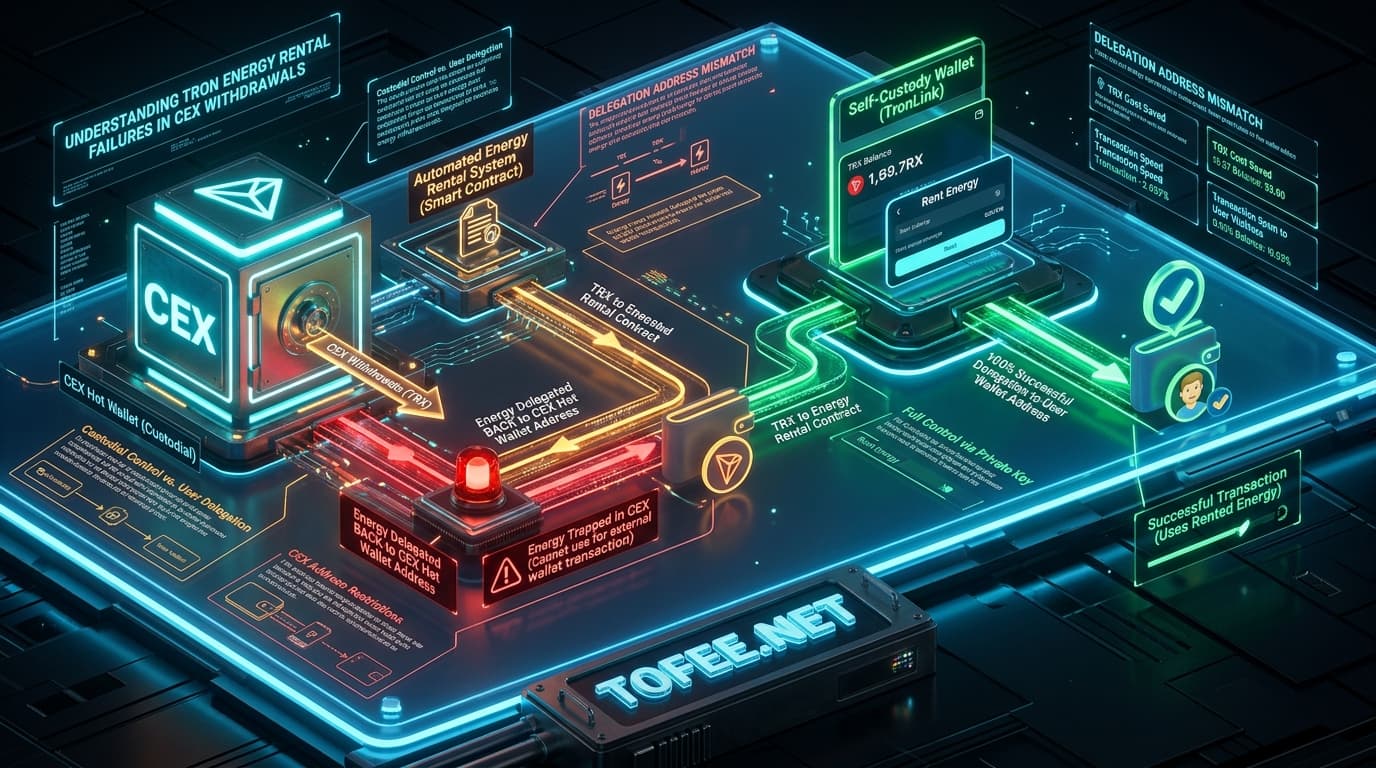
Automated TRON Energy rental platforms deliver resource delegations in under 6 seconds through on-chain event listeners. When a payment transaction hits the platform's deposit contract, the automated bot parses the on-chain transaction data to identify the Sender Address (from_address) and immediately triggers a smart contract delegation to that exact address.
When you withdraw funds from a centralized exchange:
You do not initiate an on-chain transaction from your personal address. Your exchange account is merely an internal database ledger entry.
The exchange initiates the transaction from its own custodial hot wallet pool.
The on-chain sender is the exchange's hot wallet, not your private wallet.
As a result, the automated rental platform detects the exchange's multi-signature hot wallet as the sender and instantly delegates the 65,000 or 131,000 Energy to the exchange's pool. Because you do not hold the private key to the exchange's hot wallet, that Energy remains completely inaccessible to you.
Custodial Balances vs. Self-Custody Wallets
Feature
Centralized Exchange (CEX)
Self-Custody Wallet (TronLink, Trust Wallet)
Private Key Ownership
Held by the exchange custodian
Exclusively held by you
On-Chain Sender ID
Exchange Hot Wallet cluster
Your unique public TRON address
Delegated Energy Recipient
Exchange Hot Wallet (Lost/Unusable)
Your personal address (Active immediately)
Direct Rental Compatibility
❌ Incompatible (Do Not Use)
✅ 100% Compatible & Instant
The Correct Two-Step Workflow
To ensure your Energy rental is delivered instantly to your wallet every time, follow this standard two-step procedure:
graph LR
    A["Centralized Exchange<br/>(Binance, OKX, Bybit)"] -->|"1. Withdraw TRX"| B["Self-Custody Wallet<br/>(TronLink, Trust Wallet, Ledger)"]
    B -->|"2. Send Rental Payment"| C["ToFee Energy Platform"]
    C -->|"3. Instant Energy Delegation"| B
Step 1: Withdraw TRX to Your Own Self-Custody Wallet
Withdraw TRX from your exchange account to a self-custody wallet that you control (such as TronLink, Trust Wallet, or a hardware wallet). Wait a few seconds for the block confirmation.
Step 2: Pay the Rental Order From Your Self-Custody Wallet
From within your self-custody wallet, transfer the exact rental amount (e.g. 1.5 to 3 TRX) to the ToFee deposit address or execute the order via our Web3 dApp interface.
Because the transaction originates from your personal public address, the smart contract immediately identifies you as the rightful recipient and delegates the Energy within 3 to 6 seconds.
What to Do If You Already Sent TRX From an Exchange
If you have already sent a rental payment directly from a CEX withdrawal:
Locate the Transaction Hash (TxID): Copy the withdrawal transaction hash from your exchange withdrawal history.
Contact Platform Support: Send the TxID to ToFee Support along with your intended self-custody wallet address.
Manual Verification: While on-chain delegations sent to an exchange hot wallet cannot be reversed on the blockchain, customer support can verify the payment arrival and assist in manually issuing Energy to your intended wallet address.
Frequently Asked Questions
Does this issue occur on all centralized crypto exchanges?
Yes. All major exchanges (Binance, OKX, Bybit, KuCoin, Gate.io, Kraken, HTX) broadcast withdrawals from pooled institutional hot wallets rather than user-specific private keys.
How can I verify whether my wallet is self-custody or custodial?
If you possess a 12/24-word recovery phrase or private key backup, it is a self-custody wallet. If you access your funds through an email, phone number, and password login on a centralized platform, it is custodial.
Does transferring TRX to my self-custody wallet first cost extra fees?
You only pay the standard exchange network withdrawal fee (typically ~1 TRX). Moving TRX from your self-custody wallet to the rental contract consumes negligible bandwidth, keeping total costs minimal.
How long does TRON Energy delegation take when paid from a self-custody wallet?
Delegation is automated on-chain and completes within 3 to 6 seconds following transaction broadcast.
Can I automate recurring energy rentals without making manual transfers each time?
Yes. By using a ToFee Fixed Recharge Address, you can whitelist your self-custody address so that any incoming transfer automatically triggers instant Energy delivery without manual web form entries.
Can centralized exchanges credit delegated Energy back to my exchange account?
No. Centralized exchanges do not maintain individualized Energy balances for internal user accounts; internal transfers on exchanges occur off-chain within their database.
What self-custody wallets are recommended for TRON Energy rentals?
TronLink (official TRON wallet), Trust Wallet, SafePal, imToken, and Ledger hardware wallets connected via TronLink are all fully compatible.
INSTANT TRC-20 GAS REDUCTION
Execute Your Next USDT Transfer with Maximum Savings
Equip your wallet with instant non-custodial energy in 3 seconds directly on our automated deposit gateway.
Is renting TRON energy safe? Learn how TRON's non-custodial Stake 2.0 delegation protects private keys, how to spot rental scams, and how to verify delegations on TronScan.
Compare TRON energy rental vs staking TRX for TRC20 USDT transfers. Analyze capital requirements, Stake 2.0 14-day lockup timelines, and opportunity costs.